Salesforce Data Dictionary
Salesforce orgs grow into thousands of fields, rules and automations that nobody fully remembers, so I built Data Dictionary to document them automatically. It reads the metadata straight from your Git repository and turns it into searchable, always-current documentation inside Salesforce itself: objects, fields and relationships; automation like flows, triggers and Apex classes; and the security model around them. ERDs, dependency maps and generated docs, all on demand. No spreadsheets, no separate wiki, no context switching, and nothing goes stale.
Demo available on desktop or tablet only.
Documentation that lives where you work
Most Salesforce teams document their org in spreadsheets and wiki pages. Those go stale the moment they are written, and nobody owns keeping them current.
Data Dictionary takes a different source of truth: the metadata your team already keeps under version control. It connects to the repo, reads the force-app source, and builds a complete picture inside Salesforce: every custom object, field and relationship, plus the automation and security layers around them.
Everything then surfaces through native Lightning components on a dedicated Data Dictionary app: searchable explorers, ERDs, dependency maps and generated documentation, all on demand.
metadata_surfacethe types the cache reads
The Salesforce Data Dictionary, Toured
A walk through the app in a demo org: the Metadata Explorer, the ERD viewer, the Dependency Viewer and the Documentation viewer.
How It Works
The Git repository is the source: Bitbucket, GitHub, GitLab, Azure DevOps or AWS CodeCommit. Named and External Credentials handle authentication. Apex fetches and parses the metadata, with large runs chunked through a Platform Event so they never hit governor limits. The parsed result is cached in custom objects and rendered by Lightning Web Components.
External and Named Credentials authenticate to the Git provider, with a provider factory covering Bitbucket, GitHub, GitLab, Azure DevOps and AWS CodeCommit behind one interface. The repository and sync Apex layers pull the metadata source and parse it. A Platform Event continuation pattern breaks large repos into chunks so a full build stays within limits.
Parsed metadata is stored in Repository_Metadata_Cache__c, with each build tracked in Repository_Metadata_Run__c. Custom Metadata Types control which metadata is read and how columns are displayed.
Seven viewers render the cache: Metadata Explorer, Dependency Viewer, ERD Viewer, Documentation Viewer, Repository Explorer, Integration Setup wizard, and Application Configuration. Integration Setup provides guided credential configuration; Application Configuration manages presentation settings. They live on the Data Dictionary app and can be dropped onto any Lightning page in App Builder.
Confluence to Salesforce, Through Git
The Documentation Viewer is not limited to auto-generated reference material. It also renders real docs pulled from the same repository, and those often start life in Confluence. The Developer Tools VSCode extension exports a Confluence space to Markdown, a developer commits it alongside the metadata, and Data Dictionary picks it up on the next refresh through the same repository connection used for everything else.
flowchart TD
    A["Confluence space
pages + images + attachments"] --> B["VSCode: Developer Tools
Confluence Export wizard"]
    B --> C["Storage XML to Markdown (turndown)
images/ mirrors the page tree"]
    C --> D["git commit & push
force-app documentation folder"]
    D --> E["Git repository
(Bitbucket / GitHub / GitLab /
Azure DevOps / AWS CodeCommit)"]
    E --> V["Documentation Viewer (LWC)
Refresh"]
    V --> F["DocumentationDiscoveryQueueable
walk tree, collect .md paths"]
    F --> G["DocumentationContentBatchQueueable
fetch content in batches"]
    G --> H["DocumentationImageService
resolve & cache images"]
    H --> I["Upsert Documentation_Page__c"]
    I --> V

    %% Blueprint tokens as literal hex (Mermaid cannot parse CSS vars or color-mix)
    classDef apex fill:#8b93e81f,stroke:#8b93e8,stroke-width:1.5px;
    classDef lwc  fill:#62d99a1f,stroke:#62d99a,stroke-width:1.5px;

    class F,G,H,I apex;
    class V lwc;
Indigo nodes are the same Apex layer that parses metadata elsewhere on this page; green is the Lightning Web Component that renders it. Everything left of the Git repository happens outside Salesforce, in the same repo the metadata sync already trusts.
The Viewers
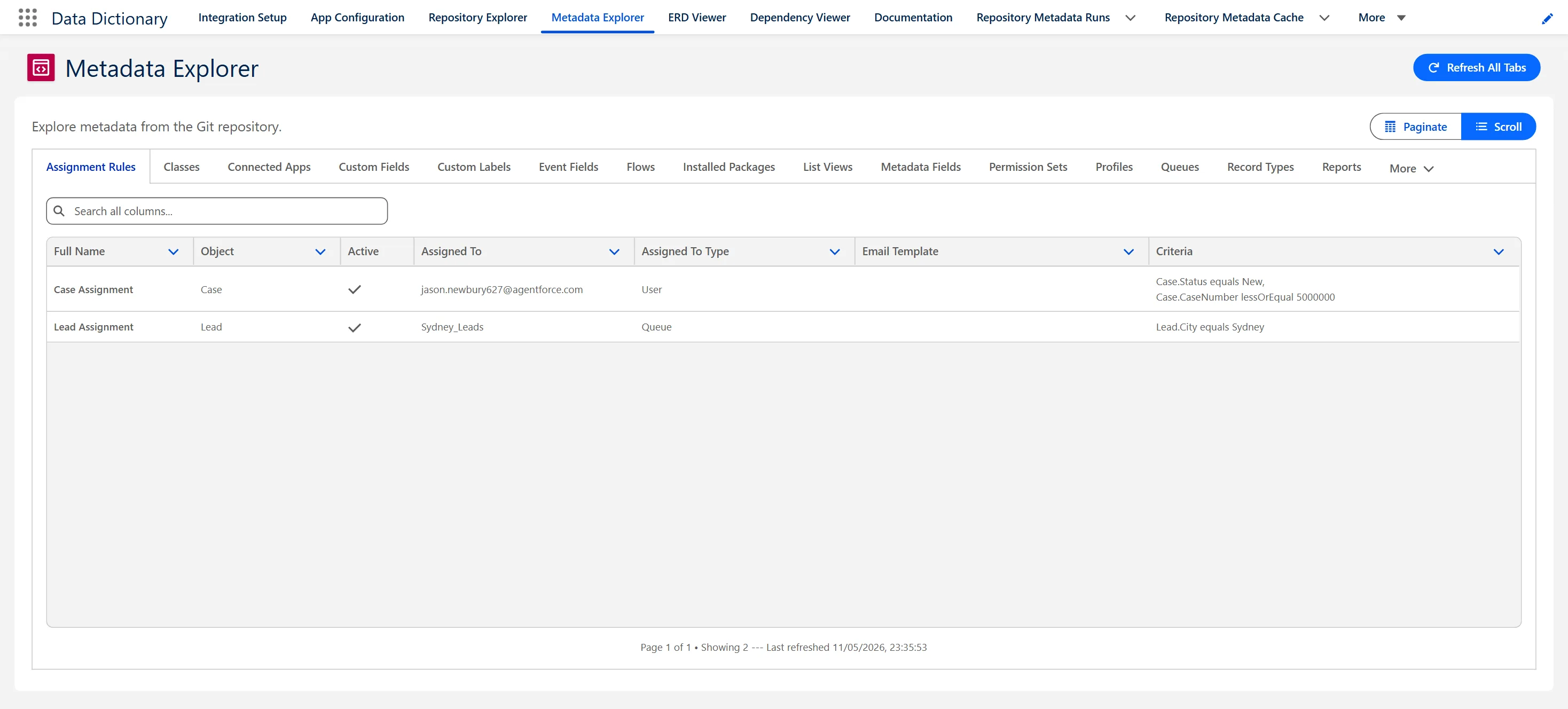
A searchable view of the full metadata surface straight from the repo: every object, field, automation and security layer. Filter by type, then read each item's API name, label and key attributes without opening Setup or VSCode.
Entity-relationship diagrams generated from the cached metadata, showing lookup and master-detail links across standard and custom objects. Rendered with Cytoscape.js with selectable layouts (hierarchical, breadth-first, circle, grid) and a resizable inspector panel. Useful for design reviews without hand-drawing diagrams that are out of date by the next sprint.
Trace relationships and references between components with a minimap, zoom/drag, right-click context menu, and collapsible inspector panel. The kind of exploration interface usually found in dedicated diagramming tools, built natively in Lightning Web Components.
Read generated, structured documentation with a Markdown renderer, syntax highlighting, and a synced outline. Readable technical reference for the whole team, regenerated from the repo rather than maintained by hand.
Navigate the connected repository's metadata directly inside Salesforce, with each build's run history and status visible so you know exactly what the cache reflects.
Guided setup screens connect the repository integration and tune what gets read and displayed, driven by Custom Metadata Types rather than hardcoded values. Errors are captured in Error_Log__c for troubleshooting.
Useful to Everyone on the Team
The same cached picture serves different people in different ways, from the first scoping conversation through to support years later.
Look up an API name, check what depends on a field, and understand existing patterns before writing code, without leaving Salesforce.
Generate relationship diagrams for design reviews, validate relationships, and spot reuse opportunities before adding new objects.
See what already exists when mapping requirements, and avoid asking for fields the org already has.
Use the relationship and field reference to design test scenarios that cover the objects a change actually touches.
A current inventory of configuration to refer to, instead of clicking through Setup to remember how something was built.
Look up field context and relationships when triaging an issue, with fewer escalations to the dev team just to ask what a field does.
A clearer read on complexity for estimates, and faster onboarding for anyone joining the project.
Visual relationship diagrams make the design legible to non-developers, and the knowledge stays in the platform when people move on.
Documentation that rebuilds itself
Data Dictionary builds the picture from the repo, so the value comes from never having to do that work by hand again.
A traditional data dictionary is a deliverable. Data Dictionary treats the same information as a build output, generated from the metadata already in your repo.
Value across the build and support lifecycle
Custom objects, fields, automation and integrations
Functional testing, integration testing, UAT
Deployment, hypercare and ongoing support
Enhancements, scaling and new integrations